

Are you wondering what Essential Features of Environmental Compliance Software you need?
Environmental compliance rarely fails because organisations don’t care. It fails because data is fragmented.
A regulator calls. They want a groundwater trend report—this time using updated guideline values and including five years of historical PFAS data. The lab results sit in PDFs. Field sheets are in spreadsheets. Someone manually compares results against standards. Someone else checks exceedances. A director signs off.
Nothing is intentionally wrong. But every manual step introduces risk.
In FY2024 alone, the US EPA concluded over 1,800 civil enforcement cases and charged 120+ criminal defendants, achieving more than 225 million pounds of pollution reductions in impacted communities. Meanwhile, widely cited compliance research estimates the average cost of non-compliance at $14.82 million, compared to $5.47 million to maintain compliance.
Environmental compliance software exists to close that gap.
For senior leaders, the question isn’t “What software looks impressive?” It’s: Which system reduces compliance risk, improves reporting speed, and strengthens defensibility—without increasing operational complexity?
Table of Contents
- What Environmental Compliance Software Must Actually Do
- The 10 Essential Features
- Why EDMS Platforms Outperform Point Compliance Tools
- Where ESdat Fits
- Executive Vendor Evaluation Checklist
- Key Takeaways
- Glossary
- FAQs
What Environmental Compliance Software Must Actually Do
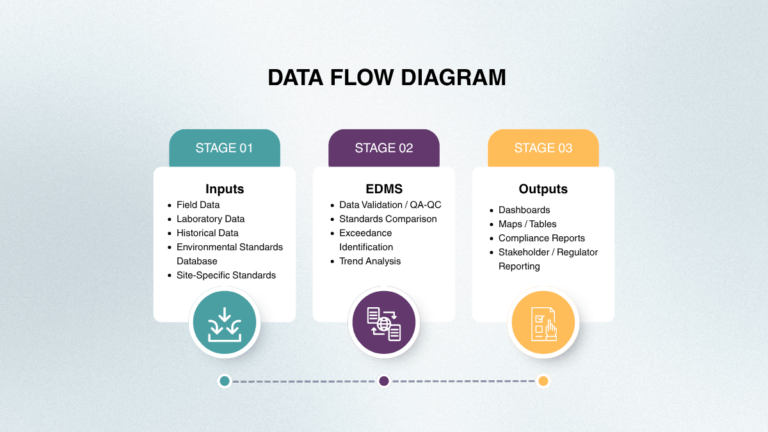
Effective compliance software must perform four functions simultaneously:
- Capture environmental data reliably (lab, field, sensors, historical datasets)
- Validate it (QA/QC, format checks, completeness, outlier detection)
- Assess compliance automatically (guideline comparisons, exceedances, alerts)
- Prove defensibility (audit trails, version history, reproducible reports)
If a system only handles documents or task tracking, it addresses symptoms—not root risk. The true exposure lies in data fragmentation and manual handling.
The 10 Essential Features of Environmental Compliance Software
1) Centralised, Structured Environmental Database
Compliance cannot rely on folders and spreadsheets. A strong platform standardises sites, locations, analytes, units, and methods so historical and incoming data stays consistent and queryable.
Executive test: Can your team retrieve every PFAS result at a site since 2016 in seconds?
2) Automated Laboratory Data Integration (EDD / LIMS Connectivity)
Manual lab uploads are one of the largest compliance risks. Modern platforms integrate EDD imports, validate results on import, and flag errors immediately—reducing rework and improving auditability.
3) Field Data Capture and Chain-of-Custody Control
Paper field sheets introduce delays and transcription risk. Effective systems support paperless capture, offline workflows, chain-of-custody tracking, and direct syncing into the compliance database. Compliance Workflow
4) Built-In QA/QC Validation
Good software embeds quality checks: required fields, unit and method consistency, completeness tracking, and outlier detection—so bad data doesn’t become bad decisions.
5) Pre-Loaded and Maintained Regulatory Guideline Libraries
This is a major differentiator. Advanced systems include maintained guideline libraries, automatic exceedance comparisons, and the ability to re-assess historical data when standards change.
6) Real-Time Exceedance Detection and Alerting
Quarterly review cycles are too slow for modern risk management. Automated exceedance alerts shift compliance from reactive to proactive.
7) Executive Dashboards with Drill-Down Capability
Leaders need fast answers: status summaries, trends, exceedance visibility, and the ability to drill down to source data without spreadsheet archaeology.
8) Regulator-Ready Reporting and Repeatable Templates
Compliance reporting must be repeatable and defensible. Look for template-driven outputs (PDF/Word/Excel) that can be regenerated quickly for different periods and guideline sets.
9) Audit Trails and Governance Controls
Governance matters: role-based permissions, change history, version control, retention rules, and evidence trails that stand up under scrutiny.
10) Usability for Operational Teams
If the system requires specialist administrators for routine work, adoption stalls. The best platforms are usable by project managers and scientists while still supporting enterprise governance.
Why EDMS Platforms Outperform Point Compliance Tools
Many compliance tools focus on tasks, permits, or document management. Few manage environmental data ingestion, validation, guideline comparisons, exceedances, and reporting in one workflow. EDMS-style platforms reduce fragmentation, rework, and key-person dependency.
Where ESdat Fits
ESdat is best understood as an Environmental Data Management System with integrated compliance monitoring. It is commonly evaluated by organisations looking for browser-based workflows, no-code configuration, reliable lab imports, guideline comparisons, exceedance visibility, and repeatable reporting.
Executive Vendor Evaluation Checklist
- Demonstrate lab-to-dashboard workflow end-to-end
- Switch guideline sets across historical data
- Reproduce a previous report exactly (audit-ready)
- Configure exceedance alerts by role/site/program
- Show field-to-database traceability
- Explain governance controls (permissions, audit trail)
- Prove multi-site scalability
- Show template-based reporting outputs
- Describe time-to-value for a single site rollout
- Explain how regulatory updates are handled
Key Takeaways
- Data-first compliance reduces operational risk more than document-only tools.
- Lab + field integration is the fastest lever for reducing rework and improving defensibility.
- Guideline libraries and alerting convert compliance from reactive to proactive.
- Audit trails and repeatable templates protect confidence at executive level.
- Integrated EDMS platforms (including ESdat) typically scale better than fragmented tools.
Glossary
- EDMS: Environmental Data Management System
- EDD: Electronic Data Deliverable (standardised lab data file)
- Exceedance: A result above a regulatory limit or internal threshold
- Guideline Library: Maintained database of standards used for automated comparison
- QA/QC: Quality assurance and quality control checks on data
- Chain of Custody (CoC): Documentation of sample handling from collection to lab
- Audit Trail: Log of changes showing who modified data and when
Frequently Asked Questions
What is the difference between environmental compliance software and an EDMS?
Compliance software often focuses on documents and tasks. An EDMS manages data ingestion, validation, analysis, and reporting—where most compliance risk sits.
Why are guideline libraries important?
They standardise exceedance checks, reduce manual interpretation errors, and allow fast reassessment when standards change.
How does automated lab integration improve compliance?
It reduces transcription errors, speeds reporting cycles, and ensures consistent validation logic across datasets.
Is environmental compliance software useful for mid-sized organisations?
Yes—if monitoring is recurring, multi-site, or regulator-facing, automation typically reduces cost and risk compared to manual processes.
How long does implementation take?
Modern platforms can often deploy site-by-site, delivering early operational value without waiting for a big-bang rollout.
Related Articles to Choosing Environmental Compliance Software
Best Environmental Data Management for Compliance Reporting
What is a Monitoring Round in Environmental Data Management and Compliance Monitoring?
Why Use an EDMS for Environmental & Landfill Compliance Monitoring (and Why Many Teams Choose ESdat)
The Role of Environmental Compliance Across Industries