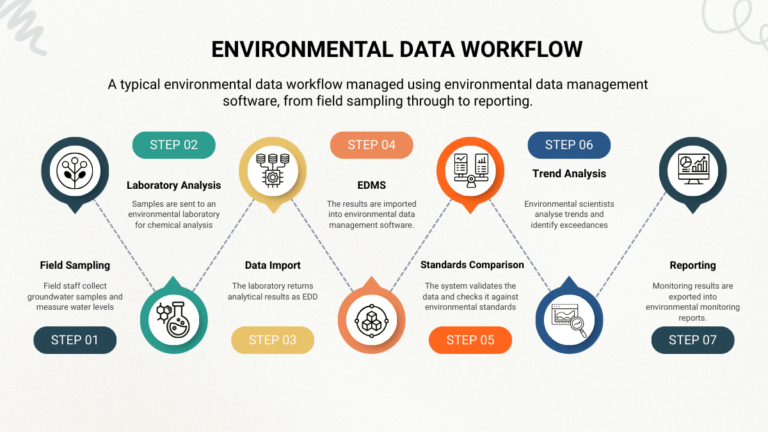


A field portal is the bridge between environmental fieldwork and your Environmental Data Management System (EDMS). It’s the field-facing interface (usually mobile-friendly) where technicians and contractors capture observations, groundwater levels, field parameters, and photos, then sync everything to the central system so managers can review progress and data quality quickly.
In mature workflows, a field portal also supports planned sampling events, structured forms, validation rules, and chain-of-custody details—reducing rework, shortening reporting cycles, and lowering compliance risk.
ESdat’s Field Portal (browser-based) and ESdat Field App (offline-capable) are designed specifically for environmental monitoring—so field capture, QA, and reporting stay connected end-to-end. Learn more.
Key takeaways (for busy leaders)
- A field portal reduces rework, transcription errors, and delayed visibility by moving field capture into a controlled EDMS workflow.
- Look for offline capability, configurable forms, validation rules, and clear sampling-event structure (e.g., monitoring rounds and location visits).
- Digital eCOC / lab requests and discrepancy checks improve QA and turnaround on high-volume programs.
- ESdat supports field observations, groundwater levels, field chemistry, photos, plus offline capture and automatic sync when back online.
Table of contents
1) What a field portal is (and what it isn’t)
A field portal is not just a digital form. In environmental monitoring, it should do three things:
- Guide the technician through consistent, site-specific data capture (right fields, right units, right tolerances).
- Connect fieldwork to the sampling-event structure (who did what, where, and when).
- Synchronize to the EDMS so managers can validate and report without manual re-entry.
In ESdat, fieldwork is commonly organized into a Monitoring Round (sampling event) containing multiple Location Visits. This structure is what turns “field notes” into operational, auditable data. Reference.
2) Why it matters to directors and managers
For senior teams, the value of a field portal isn’t “nice UX.” It’s risk control and operational leverage:
- Faster visibility: See progress and issues while work is underway, not weeks later.
- Lower compliance risk: Consistent capture and validation reduce missing fields, incorrect units, and weak audit trails.
- Lower cost-to-report: Fewer manual steps means fewer hours cleaning and reformatting field data.
- Better governance: Clear permissions and review workflows help when multiple teams or contractors are involved.
If you manage multiple sites, contractors, or regulators, a field portal becomes a standardisation layer—so field variability doesn’t become reporting variability.
3) Core capabilities to expect
A) Environmental-specific capture
At minimum, a field portal should support:
- Observations / notes
- Groundwater levels
- Field chemistry / field parameters
- Photos and supporting documents
ESdat’s Field Portal and Field App support these field data types. Details.
B) Offline-first operation (critical in real field conditions)
Connectivity is rarely guaranteed. ESdat positions the Field App as an upgrade to the browser-based portal, designed to work offline and sync automatically when coverage returns. Read more.
C) Configurable forms and attributes
Every program is different. Look for configurable forms, custom attributes, controlled lists, and role-based visibility. ESdat describes adding additional fields and capturing relevant supporting information. Field Programs overview.
D) Validation and stabilization feedback
Two high-value accelerators:
- Validation rules (required fields, expected ranges) to catch errors early.
- Stabilisation feedback during groundwater purging so techs know when criteria are met.
ESdat references validation and stabilization features as part of its field workflow. Reference.
E) Digital chain-of-custody and lab requests (where maturity shows)
For lab-based programs, look for digital workflows that reduce sample admin errors and mismatches. ESdat describes an eCOC workflow sent from ESdat to the lab and a lab response (eSRN) used to check for discrepancies. Field Management overview.
4) How ESdat approaches field portals
ESdat’s design intent is that field capture is not a bolt-on—it’s part of the operational loop from planning to QA to reporting.
ESdat Field Portal (browser-based)
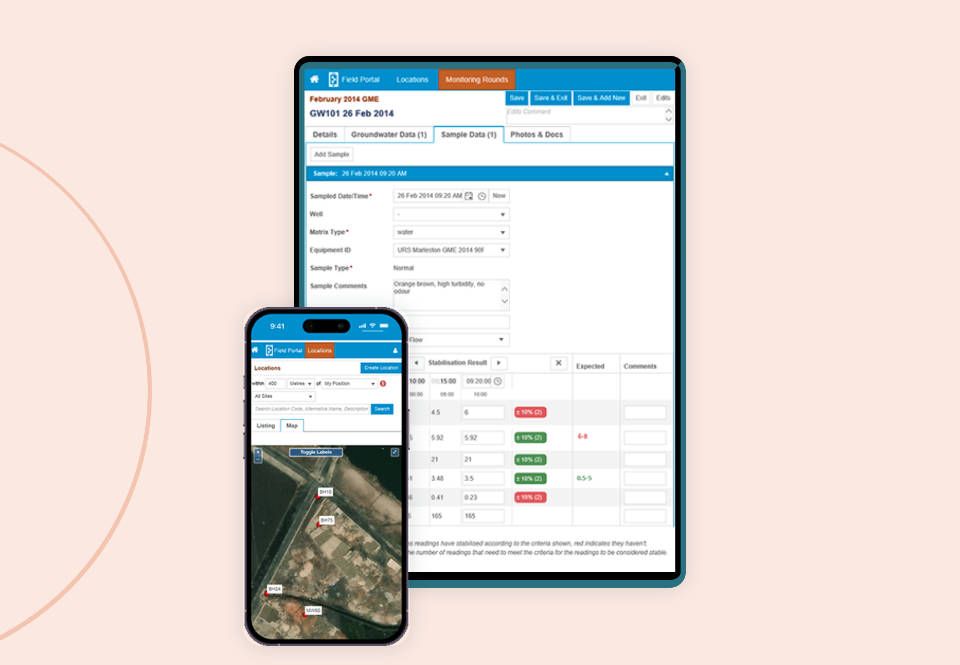
- Field entry from PC, tablet, or phone
- Capture observations, groundwater levels, field chemistry, photos
- Structured around Monitoring Rounds and Location Visits
Field Portal & Field App (Help)
ESdat Field App (offline-capable)
- Designed to work offline on phone/tablet/laptop
- Automatic sync when back online
- Field data flows into field sheet reporting and standard tables/graphs
Offline Field Portal / Field App
Field programs and supervision
ESdat frames field portals as part of running consistent, repeatable programs: planned sampling, ad-hoc capture, validation, and progress visibility for supervisors.
5) A practical selection checklist
- Offline capability: Can teams capture everything offline and sync cleanly later? (ESdat example)
- Sampling-event structure: Are monitoring rounds and location visits clearly modelled? (ESdat structure)
- Field QA: Validation rules and stabilisation feedback available? (ESdat validation)
- Evidence capture: Photos, timestamps, and supporting documents auditable? (ESdat capture)
- Lab workflow support: eCOC and discrepancy checks to reduce errors? (ESdat eCOC)
- Governance: Roles, permissions, approvals—especially with contractors.
- Reporting readiness: Does field data flow into tables/graphs/reports without manual reshaping? (ESdat reporting flow)
6) Implementation: what “good” looks like
A field portal delivers ROI when it’s implemented as a workflow, not just a rollout:
- Standardise field profiles: required fields, units, controlled lists, validation rules per program.
- Pilot one program: prove the workflow on a representative monitoring round, then expand.
- Train to exceptions: validation + stabilisation + evidence capture prevents rework later.
- Operational oversight: supervisors need a clean view of progress and gaps while teams are still in the field.
- Close the lab loop: where applicable, implement eCOC workflows to reduce admin errors and turnaround delays.
ESdat describes field programs that support planned and ad-hoc workflows, validation, offline data capture, and supervision visibility. Reference.
7) FAQs
What’s the difference between a field portal and a field app?
A field portal is commonly browser-based. A field app is typically mobile-optimised and often adds offline capability. ESdat positions the Field App as an upgrade to the Field Portal with offline operation and automatic syncing. Reference.
What data should a field portal capture for environmental monitoring?
At minimum: observations/notes, groundwater levels, field parameters/field chemistry, and photos—plus project-specific attributes. Reference.
Why is offline mode so important?
Because field teams often work outside reliable coverage. Offline capture with later synchronization prevents paper fallback and reduces transcription errors. ESdat’s Field App is designed to work offline and sync when back online. Reference.
How does a field portal improve QA/QC?
By applying validation rules at the point of capture (required fields, expected ranges) and supporting field processes like stabilisation feedback during purging. Reference.
What is eCOC and why should managers care?
eCOC (electronic chain of custody) digitises sample details and lab requests so labs can process check-ins with fewer errors. ESdat describes an eCOC flow plus an eSRN response file that helps detect discrepancies between what was requested and what was received. Reference.
Can field portals support both planned and ad-hoc sampling?
Yes. Strong systems support planned rounds/events and allow ad-hoc capture when conditions change. ESdat describes completing a sampling plan or collecting ad-hoc data. Reference.
8) Glossary
- EDMS (Environmental Data Management System)
- Software used to store, validate, analyse, and report environmental data.
- Field portal
- The field-facing interface (often web-based) used to capture field data and synchronise it to the EDMS.
- Field app
- A mobile-optimised application, often with offline capability, used to capture field data and sync later. (ESdat example)
- Monitoring round (Sampling event)
- A single round of monitoring at one or more locations. (Reference)
- Location visit
- A single visit to a sampling/monitoring location at a specific date/time, typically part of a monitoring round. (Reference)
- Field parameters / field chemistry
- Measurements taken in the field (e.g., during groundwater purging) prior to lab results. (Reference)
- Stabilisation readings
- Time-stamped field measurements tracked during purging until stabilisation criteria are met. (Reference)
- eCOC (Electronic Chain of Custody)
- A digital file containing sample details, requested analyses, and container information, sent to labs. (Reference)
- eSRN
- A lab response file used to verify received samples/analyses against the original request and flag discrepancies. (Reference)
Related Articles to Field Portals for Environmental Data Management
ESdat Public Portal: Share Environmental Data with Ease
Field and Sample Planning Optimized with LSPECS: The Ultimate Add-On to ESdat
Monitoring Environmental Data: Tronox’s Public Portal, running on ESdat Environmental Database Software
What is Environmental Field Data?
The Limits of Excel for Environmental Data Management — and the Case for an EDMS