

The Limits of Excel
1) Why Excel is so hard to quit
Excel persists because it’s genuinely excellent at a specific job: quick analysis on small datasets. It’s described as the best tool for “quick and easy analysis” when you’re exploring a small dataset. That’s often true in environmental work too.
Excel is great for early-stage scoping, fast checks, quick charts for a presentation, and ad-hoc “what-if” calculations. The problem starts when Excel stops being a tool and quietly becomes the system.
2) The Excel trap in environmental programs
Environmental data management isn’t just rows and columns. It often includes multiple data streams (lab, field, logger/sensor, geology, GIS), evolving standards and compliance obligations, QA/QC expectations, and multi-site stakeholder reporting.
Management using spreadsheets have a common pattern: data arrives, gets routed through spreadsheets and macros, and “spits out the other end. ” In environmental programs, that frequently looks like:
- Lab results arrive and get pasted into a “master workbook”
- Macros “clean” and format results
- A separate workbook holds standards and thresholds
- Someone manually checks exceedances
- Charts and tables are rebuilt for each reporting cycle
- Files circulate by email, Teams, and shared drives
This can work-until it doesn’t. And when it fails, it tends to fail silently: errors, discrepancies, and delays appear at the worst possible time.
3) The risks that matter to senior leaders
Compliance defensibility risk
In regulated environments, leadership needs to confidently answer:
- Where did this number come from?
- Who changed it, when, and why?
- What validation rules and QA/QC checks were applied?
Excel is not designed to provide a robust, consistent audit trail across teams and years of monitoring.
Operational risk and delay
Spreadsheet workflows slow down when more sites are added, more parameters are monitored, more labs and formats enter the picture, and reporting timelines tighten. Manual handling increases the chance of unit mismatches, missed exceedances, or inconsistent metadata.
Governance and security risk
Once “the truth” lives across multiple spreadsheets, access becomes hard to control, data becomes difficult to consolidate, and sensitive information becomes easy to duplicate and share unintentionally.
4) Why “macros + spreadsheets” don’t scale
Macros can automate steps, but they don’t solve structural issues. Spreadsheets are poorly documented and maintained, and the person who created the macros has moved on-leaving teams unable to safely run or modify workflows.
At scale, this creates:
- Documentation risk: knowledge lives in one person’s head
- Fragility: small changes break workflows and failures can be hard to detect
- Limited governance: no consistent validation, permissions, or auditability across teams
The spreadsheet stops being “flexible” and becomes fragile infrastructure.
5) What an EDMS changes in practice
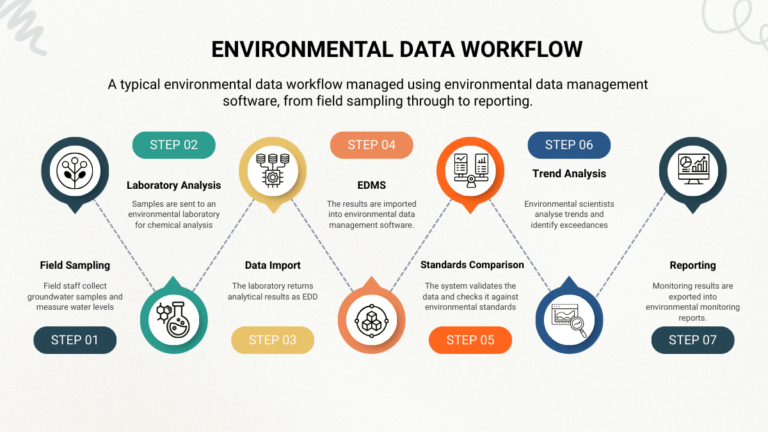
An Environmental Data Management System (EDMS) is purpose-built to turn environmental data into a governed, repeatable workflow:
- Standardised imports (including lab deliverables where applicable)
- Validation and QA/QC rules applied consistently
- Standards and exceedance workflows
- Centralised data model (single source of truth)
- Controlled access and sharing
- Repeatable reporting outputs you can reproduce reliably
For senior decision makers, the point is simple: an EDMS reduces operational drag and improves defensibility.
6) How to move off Excel without breaking the business
A common transition failure is implementing a new system while allowing spreadsheets to remain the shadow system for regulated outputs. Change can be difficult when teams try to keep existing Excel setups alongside a new platform.
A practical transition approach
- Define the system of record: decide which datasets and outputs must live in the EDMS
- Start with the highest-risk workflow: lab intake + validation + standards screening + recurring reporting
- Prevent “Excel relapse” for compliance outputs: don’t allow the old spreadsheet workflow to keep producing official numbers
- Standardise templates and metadata: naming, units, detection limits, qualifiers, site/location IDs
- Measure time-to-report: track cycle time from lab receipt > validated dataset > compliance-ready reporting
Excel can still have a role – especially for local analysis – just not as the backbone of governed environmental reporting.
7) Why ESdat is a practical step up
Many EDMS platforms are powerful but heavy. ESdat is positioned as a modern, operationally usable alternative for environmental teams who need control without excessive overhead.
The key ESdat theme is clear: environmental data is complex – your system shouldn’t be. ESdat supports consolidating lab, field, logger/sensor, historical, and standards-based workflows in one platform, reducing manual handling.
Where ESdat helps most compared with spreadsheets
- Faster, more reliable data ingestion: reduce manual copy/paste and reformatting
- Consistent validation and QA/QC: fewer silent errors and less rework
- Standards and exceedance workflows: reduce missed triggers and reporting stress
- Single source of truth: less version confusion, better governance
- Lower operational burden: less dependence on spreadsheet “heroes” and undocumented macros
Next step
If your organisation is operating with multi-site monitoring, recurring compliance reporting, or multiple contributors touching the same data, it may be time to move from spreadsheets to an EDMS. ESdat is worth shortlisting as a modern alternative designed for real environmental workflows.
Key takeaways
- Excel is excellent for quick analysis, but risky as a system of record for environmental compliance and multi-site programs.
- Spreadsheet workflows tend to fail via version chaos, weak auditability, macro fragility, and manual QA/QC.
- An EDMS improves outcomes by standardising imports, validation, standards screening, governance, and reporting.
- ESdat is positioned as a low-friction EDMS that helps teams reduce manual rework and improve defensibility.
Glossary
- EDMS (Environmental Data Management System)
- Software designed to collect, store, validate, analyse, and report environmental monitoring data using governed workflows.
- System of record
- The authoritative source used for reporting and decision-making.
- QA/QC
- Quality assurance / quality control checks applied to data to detect errors, inconsistencies, and outliers before reporting.
- Audit trail
- A record of who changed what, when, and why – important for defensible compliance reporting.
- Exceedance
- A result above (or below) a regulatory guideline or site-specific trigger level that requires investigation, response, or reporting.
- Metadata
- Data about the data – units, methods, qualifiers, detection limits, location identifiers, and contextual details needed for correct interpretation.
- Logger / sensor data
- Time-series measurements collected automatically (e.g., groundwater level, conductivity), often requiring trend review and alerting.
Frequently Asked Questions (FAQs)
Is Excel suitable for environmental data management?
Excel is suitable for small, short-term tasks such as quick analysis, early project scoping, or simple charts. However, it is not well suited as a system of record for environmental data management, especially when compliance, auditability, multi-site programs, or multiple contributors are involved.
What are the biggest risks of using Excel for environmental compliance reporting?
The main risks include:
- Human error (copy/paste mistakes, misplaced decimals)
- Weak or non-existent audit trails
- Version control problems
- Manual validation and exceedance checks
- Difficulty proving data lineage during audits or regulatory reviews
These risks increase as datasets grow and programs become ongoing rather than one-off.
Why do spreadsheets fail as environmental programs scale?
Spreadsheets struggle to scale because they lack:
- Centralised governance
- Controlled metadata and validation rules
- Secure, role-based access
- Robust handling of multiple data types (lab, field, logger, GIS)
As more sites, labs, and stakeholders are added, spreadsheets become fragile and time-consuming to maintain.
Can Excel macros solve these problems?
Macros can automate repetitive steps, but they do not solve core issues such as governance, auditability, documentation, or long-term maintainability. In many organisations, macros become a risk themselves when the original author leaves or workflows change.
What is an Environmental Data Management System (EDMS)?
An EDMS is purpose-built software designed to:
- Import and standardise environmental data
- Apply consistent QA/QC and validation rules
- Screen results against regulatory standards
- Maintain a single source of truth
- Support defensible reporting and compliance workflows
Unlike spreadsheets, EDMS platforms are designed for long-term, multi-user, regulated environments.
When should an organisation move from spreadsheets to an EDMS?
You should consider moving to an EDMS when:
- You manage multiple sites or long-running monitoring programs
- Compliance reporting is recurring or high-risk
- Multiple people or teams touch the same data
- Manual QA/QC and reporting are slowing down decision-making
- Auditability and governance are becoming concerns
If spreadsheets are causing delays or uncertainty, the transition is overdue.
Does moving to an EDMS mean giving up Excel completely?
No. Excel can still be useful for local analysis, ad-hoc calculations, and exploratory work. The key change is that Excel should no longer be the system of record for regulated or operational environmental data.
How does an EDMS reduce compliance risk?
An EDMS reduces risk by:
- Enforcing validation rules automatically
- Applying consistent standards and exceedance checks
- Maintaining audit trails
- Reducing manual data handling
- Producing repeatable, defensible reporting outputs
This makes it easier to demonstrate compliance and respond confidently to regulators or auditors.
What makes ESdat different from spreadsheets and other EDMS platforms?
ESdat is positioned as a low-friction, modern EDMS:
- Browser-based and no-code
- Strong lab data integrations
- Supports lab, field, logger, and standards data in one system
- Built for environmental professionals rather than database specialists
- Designed to reduce manual effort and reporting stress
This makes it particularly attractive for organisations moving away from spreadsheet-heavy workflows without wanting heavy IT overhead.

Is ESdat suitable for large organisations as well as smaller teams?
Yes. ESdat is used by both mid-size teams and large organisations managing complex, multi-site environmental programs. Its scalability allows teams to start with core workflows and expand as monitoring programs grow.
What is the first step to replacing spreadsheets with an EDMS?
A practical first step is to:
- Identify your highest-risk workflow (often lab data intake + compliance reporting)
- Define which data must live in the EDMS as the system of record
- Standardise metadata, templates, and validation rules
- Gradually retire spreadsheets from regulated outputs
This phased approach reduces disruption while delivering early value.
Related Articles to The Limits of Excel
The 5 Reasons Excel is NOT Reliable Data Management Software
Environmental Data Management: Spreadsheets vs Environmental Data Management Software (EDMS)
Why Use an EDMS for Environmental & Landfill Compliance Monitoring (and Why Many Teams Choose ESdat)
Top EQuIS Enterprise Alternatives & Competitors for 2025