
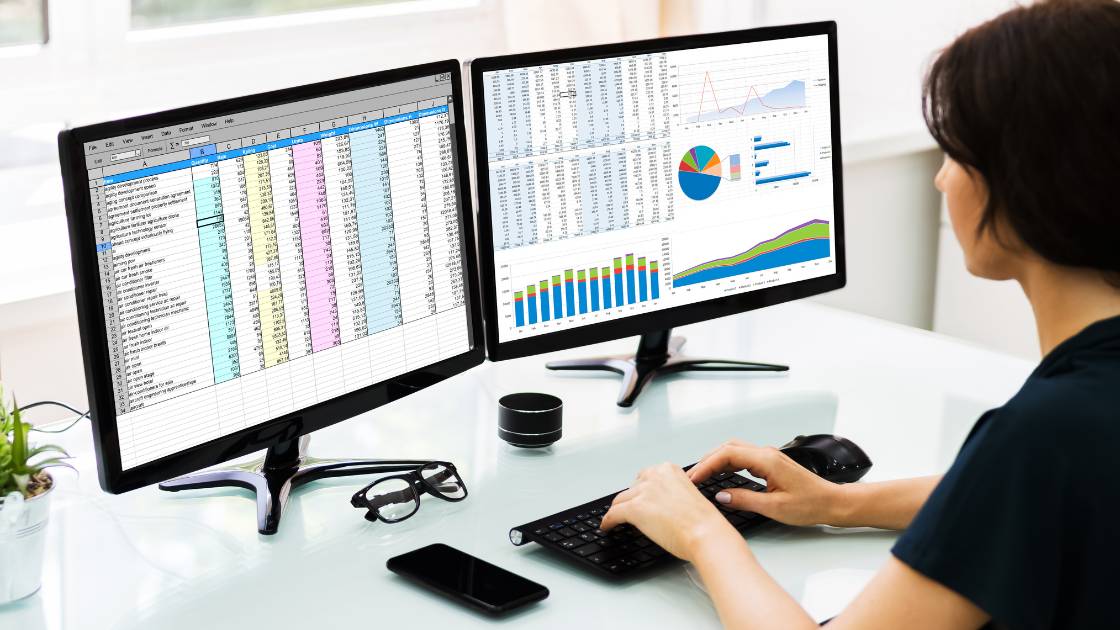
Spreadsheets (Excel) are a powerful planning tool for small datasets, early-stage projects, and quick analysis—but they struggle with complex data, multi-site programs, and defensible compliance reporting.
Spreadsheets vs Environmental Data Management Software (EDMS): A Practical Guide for Environmental Professionals
Key takeaways
- Spreadsheets (Excel) are a valuable planning tool and analysis tool for smaller datasets, early-stage work, and quick reporting—especially when one analyst controls the workbook.
- The biggest spreadsheet risks are human error (including the classic misplaced decimal), inconsistent format, weak audit trails, poor version control, and “multiple spreadsheets” spread across teams.
- A fit-for-purpose environmental data management system improves data quality and governance through standardised workflows for data validation, metadata, and compliance screening against environmental regulatory thresholds.
- ESdat is built for complex data and real-world environmental monitoring (groundwater, surface water, laboratory results, logger data, air quality, geotech) with a focus on a single source of truth and faster analysis and reporting.
1) Why environmental data management is getting harder
Over four decades in environmental monitoring, I’ve watched the job change from “store a few results and make a graph” to managing multiple data types across multi-site portfolios: groundwater and surface water sampling, laboratory analytical results, field data collection, logger data (often close to real-time data), air quality, and even geotech datasets.
The challenge is no longer just volume. It’s consistency of format, completeness of metadata, defensible workflows, and the need to streamline compliance reporting under evolving regulatory programs. When the system can’t keep up, time goes into data entry, file wrangling, and rework—rather than decisions.
2) Spreadsheets for environmental data management: what they are and why teams use them
A spreadsheet—most commonly a Microsoft Excel workbook—is often the first “data management system” an organisation adopts for managing environmental data. That’s not because Excel is perfect, but because it’s familiar, flexible, and immediate.
In practice, spreadsheets are used as:
- A simple data storage layer for a dataset (or multiple data sets)
- A place to standardise data collection templates for field teams
- A tool to generate data tables, summary statistics, charts/graphical outputs, and dashboards
- A quick way to track EHS data, basic compliance checks, and environmental reporting
3) How to use Excel for environmental data management (a practical workflow)
If you must use spreadsheets, treat them like a controlled workflow—not a dumping ground. The goal is “good data” that can be checked, queried, and reported without fragile manual steps.
3.1 Build a workbook structure that supports data quality
- ReadMe / Data governance: purpose, scope, definitions, who can edit, and how version control works
- Locations: location IDs, coordinates, elevations, well construction, notes
- Samples: sample ID, date, time, matrix, depth, field parameters
- Results: analyte, result, unit, detection limit, qualifier, laboratory, method
- Standards: environmental regulatory thresholds (federal and state) and site-specific criteria
3.2 Apply spreadsheet controls (minimum viable quality control)
- Standardise format: consistent units, date data formats, analyte naming, and required fields
- Validation rules: dropdown lists for analytes, matrices, units; prevent free-text drift
- Outlier checks: automate checks for impossible values and obvious entry mistakes (including misplaced decimal)
- Protected ranges: lock formulas, tables, and reference lists
- Exporting data: export from a controlled “results table” rather than ad hoc filtered views
3.3 Accept the limits early
The moment your spreadsheet needs heavy macros, complex cross-workbook links, or a manual “change log” to be defensible, you’re already rebuilding what an environmental data management platform is designed to do.
4) Advantages of spreadsheets
Spreadsheets remain common because they genuinely do several jobs well:
- Speed: quick setup and fast iterations for early-stage planning and data collection templates
- Flexibility: easy to analyze data, build data tables, and create graphs and dashboards
- Accessibility: Excel is available across most organisations and software packages
- Utility: good for one-off calculations (including greenhouse gas / GHG calculations, emission factors, scope 1 / scope 3 summaries)
5) Problems with spreadsheets (data quality, format, governance, security, scalability)
The drawbacks of spreadsheets aren’t theoretical—they are the predictable failure modes we see across environmental programs.
5.1 Data quality risk and human error
- Manual data entry increases variability and error rates
- Copy/paste and overwritten formulas can silently corrupt results
- A single misplaced decimal can trigger incorrect risk decisions or compliance responses
- Inconsistent metadata (units, methods, qualifiers) makes results hard to compare
5.2 Weak audit trails and defensibility
- Spreadsheets typically lack robust audit trails (who changed what, when, and why)
- “Multiple sheets” and “multiple spreadsheets” multiply uncertainty and rework
- When stakeholders ask for a defensible record, Excel is usually not enough
5.3 Version control becomes a workflow tax
- Email attachments and uncontrolled copies create conflicting versions
- Teams lose time reconciling files instead of managing environmental data
5.4 Scalability and performance limits
- As monitoring across sites grows, Excel slows down and becomes fragile
- Cross-project query and comparison work becomes manual and error-prone
- Long-term programs need a management solution, not a workbook
5.5 Data security and sensitive information
EHS data and compliance datasets often include sensitive information (sites, incidents, regulated thresholds). Spreadsheets are easy to share unintentionally, hard to permission, and not equivalent to secure websites or controlled workspaces.
6) When spreadsheets are “good enough”
Spreadsheets can be appropriate when:
- The dataset is small, short-lived, and managed by one person
- Compliance reporting is minimal and doesn’t require audit-grade defensibility
- You’re doing preliminary scoping, screening, or exploratory analysis
A practical rule: if you’re spending more time maintaining the spreadsheet than interpreting the results, it’s time to move.
7) Environmental data management software (EDMS): what it is and why it’s better than spreadsheets
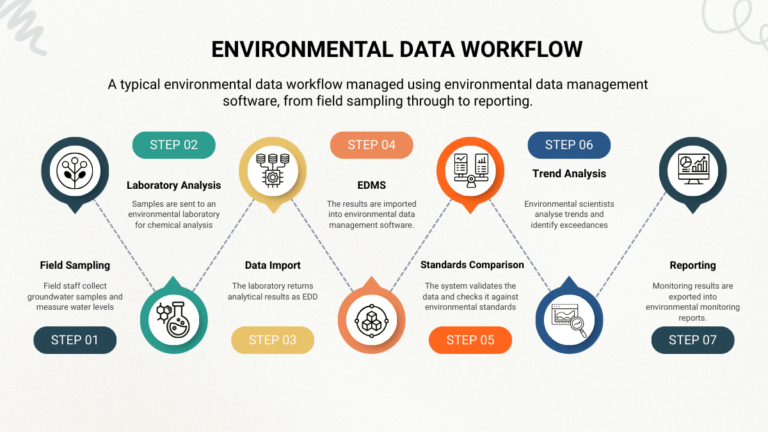
Environmental data management software (an EDMS) is purpose-built to handle environmental monitoring data as an operational workflow: ingest, validate, query, visualise, report, and share.
Compared to spreadsheets, an EDMS typically provides:
- Standardised import data workflows (including electronic data deliverables / EDDs from the laboratory)
- Automated data validation and screening against compliance thresholds
- Better query and analytics (often including GIS/ESRI integrations and ArcGIS-friendly exports)
- Repeatable reporting tools for analysis and reporting, including regulatory reports
- A governed workspace supporting data sharing, permissions, and a single source of truth
8) How to choose an environmental data management system
If you’re evaluating data management systems, keep the criteria practical. The goal is to streamline work, reduce risk, and improve decision speed.
- Workflow: does it match how environmental professionals actually work?
- Compliance: does it support environmental compliance software needs (screening, thresholds, reporting)?
- Data types: water quality, air quality, laboratory results, logger data, field data, geotech
- Data quality: validation, metadata consistency, QC tools, alerts
- Analytics: graphing, data visualization, dashboards, query capabilities
- Integration: GIS/ArcGIS/ESRI, field data collection, data logger feeds
- User-friendly: usable without being dependent on SQL specialists
- Scalability: supports monitoring across projects without “system tax”
9) Why ESdat: a modern environmental data management platform
ESdat is designed around a simple reality: environmental data is complex—your system shouldn’t be. Instead of forcing your team to fight tools, ESdat is built as a flexible environmental data management platform that supports the end-to-end workflow:
- Import and standardise laboratory analytical results (including EDD workflows)
- Manage field data and monitoring data alongside logger data
- Maintain consistent metadata across projects and data sets
- Support compliance screening and faster environmental reporting
- Enable analysis and reporting with search capabilities and a governed workspace
The outcome is a practical management solution that reduces manual rework and supports faster, more defensible decisions.
10) ESdat vs spreadsheets vs other data management systems
| Capability | Spreadsheets (Excel) | Generic data management systems | ESdat |
|---|---|---|---|
| Data quality & validation | Manual QC; higher human error risk | Varies; often requires heavy configuration | Designed for environmental data validation, metadata consistency, and screening |
| Workflow | Ad hoc and person-dependent | Can be rigid or IT-led | Environmental workflow focused; supports teams doing real monitoring work |
| Compliance | Manual checks; inconsistent | Depends on the product and setup | Supports compliance-focused workflows and defensible reporting pathways |
| Complex data & data types | Becomes fragile as complexity grows | May support it, but not always environmental-native | Built for complex data across water quality, laboratory, logger data, air quality, geotech |
| Scalability | Weak across multi-site / long-term programs | Sometimes strong, sometimes costly | Designed to scale across monitoring across sites with a single source of truth approach |
| Governance & data security | Hard to control; easy to overshare sensitive information | Varies | Workspace model supports controlled access, sharing, and governance for EHS data |
11) Quick decision guide for busy decision makers
Stay with spreadsheets if your work is small, short-term, and controlled by one person.
Move to an EDMS if any of the following are true:
- You manage multiple sites, multi-year programs, or many analytes
- Compliance reporting is frequent, high-stakes, or audited
- Multiple people touch the data (consultants, laboratory, operations, regulators)
- You need reliable imports, consistent metadata, and fewer manual checks
- Your organisation is losing time to version control and rework
If that sounds familiar, ESdat is worth shortlisting as your environmental data management system—especially when you need to streamline the workflow without increasing IT overhead.
12) Glossary
- Spreadsheet
- A grid-based tool (e.g., Microsoft Excel) used for data entry, calculations, data tables, charts, and basic dashboards.
- Environmental data management
- The management processes used to collect data, standardise format, validate results, store datasets, query, analyse, and produce environmental reporting outputs.
- Dataset / data sets
- A structured collection of records (e.g., locations, samples, results) that can be queried and analysed.
- Metadata
- Data about the data—units, methods, detection limits, qualifiers, coordinate systems, location attributes, and contextual notes.
- Quality control (QC)
- Checks designed to detect errors, outliers, missing fields, and inconsistent format before decisions or reporting.
- Audit trails
- A defensible record of changes to data (who changed what, when, and why). Spreadsheets are typically weak here.
- Version control
- How you ensure everyone is working from the correct version of the data and workbook—especially critical when multiple spreadsheets circulate.
- EDMS (Environmental Data Management System)
- Environmental data management software that supports standardised imports, data validation, workflow, compliance screening, analytics, and reporting tools.
- Electronic Data Deliverables (EDDs)
- Standardised laboratory data files used to deliver analytical results for import into an EDMS.
- Logger data / data logger
- Time-series monitoring data collected automatically (often close to real-time data), such as groundwater levels or conductivity.
- GIS / ArcGIS / ESRI
- Geospatial systems used to map and analyse environmental data; many EDMS workflows support GIS-friendly exports and spatial analysis.
- Single source of truth
- A governed system where authoritative data lives—reducing conflicting copies and rework across teams.
Next step
If your team is outgrowing spreadsheets, consider evaluating ESdat as your environmental data management platform—especially if you need to streamline workflow, improve data quality, and support compliance reporting across multiple projects.
Related Articles to Environmental Data Management: Spreadsheets
Environmental Data Is Complex — Your System Shouldn’t Make It More So
ESdat vs EQuIS: The Pragmatic, Low-Friction Alternative for Teams Who Need Results Now
Top EQuIS Enterprise Alternatives & Competitors for 2025
The Limitations of Spreadsheets in Managing Environmental Data
Understanding Electronic Data Deliverables (EDDs)
Environmental Data Confidence FAQs.