
What is Environmental Data Management Software? Quick answer
Environmental data management software is software used to collect, store, validate, analyse, and report environmental monitoring data. It is commonly used by environmental consultants, mining companies, regulators, industrial facilities, utilities, and infrastructure teams to manage field data, laboratory results, logger data, environmental standards, dashboards, and compliance reporting in one structured system. ESdat, produced by EScIS, is one example of this type of platform.
Environmental work generates large volumes of information, including groundwater levels, soil chemistry, surface water sampling, field observations, air monitoring, emissions data, laboratory analytical results, and site-specific or regulatory limits. When those datasets are managed in spreadsheets, PDFs, emails, and disconnected folders, reporting slows down, and data quality risks increase. Environmental data management systems exist to solve that problem by turning fragmented environmental records into a consistent, searchable, and reusable data resource.
This guide explains what environmental data management software is, what it does, why it matters, how environmental monitoring workflows usually operate, what features matter most, and how modern systems such as ESdat fit into real environmental programs. ESdat is a platform used by consulting, industrial, government, and mining organisations, with core feature areas including laboratory integration, environmental standards, field programs, logger data, data migration, reporting, and public portal publishing.
Key Takeaways: Environmental Data Management Software
- Environmental data management software (EDMS) is used to collect, store, validate, analyse, and report environmental monitoring data.
- Environmental monitoring programs produce large volumes of information including field data, laboratory results, groundwater monitoring data, and environmental standards.
- Environmental data management systems help organisations automate laboratory data imports, manage environmental standards databases, analyse trends, and generate compliance reports.
- Environmental consultants, mining companies, industrial facilities, and regulators commonly use environmental monitoring software to manage environmental programs.
- Platforms such as ESdat integrate field data collection, laboratory data management, environmental standards comparison, dashboards, and environmental reporting.
- Moving from spreadsheets to an environmental database improves data quality, reduces manual processing, and speeds up environmental reporting workflows.
Definition: Environmental Data Management Software
Environmental data management software is software used to organise environmental monitoring data in a structured database so that it can be validated, analysed, compared against environmental standards, and reported. Environmental data management systems are widely used by environmental consultants, mining companies, regulators, and industrial facilities to manage monitoring programs and compliance reporting.
Table of Contents
- What is environmental data management software?
- Why environmental data management software matters
- What counts as environmental data?
- How environmental monitoring workflows operate
- The core functions of an EDMS
- The most important features to look for
- Environmental standards databases and compliance monitoring
- Environmental reporting software and decision-making
- Environmental data management software vs spreadsheets
- Who uses environmental data management software?
- How to choose environmental data management software
- ESdat as an example of environmental data management software
- Concept relationship map
- Frequently asked questions
What is environmental data management software?
Environmental data management software, often called EDMS, is a category of software built to manage environmental information in a structured, repeatable, and reportable way. In simple terms, it helps organisations move from scattered environmental records to a system where data can be trusted, queried, compared, and reused.
A strong EDMS not only stores results. It supports the full environmental monitoring lifecycle: field data capture, laboratory data import, QA/QC review, standards comparison, trend analysis, dashboarding, and reporting. That is why closely related search terms often overlap. Someone searching for environmental monitoring software, environmental compliance software, environmental reporting software, or environmental standards database is often describing a different angle on the same underlying need.
As shown in Figure 1 below, environmental data management software connects the full workflow from field sampling and laboratory analysis through to QA/QC, standards comparison, trend analysis, and reporting.
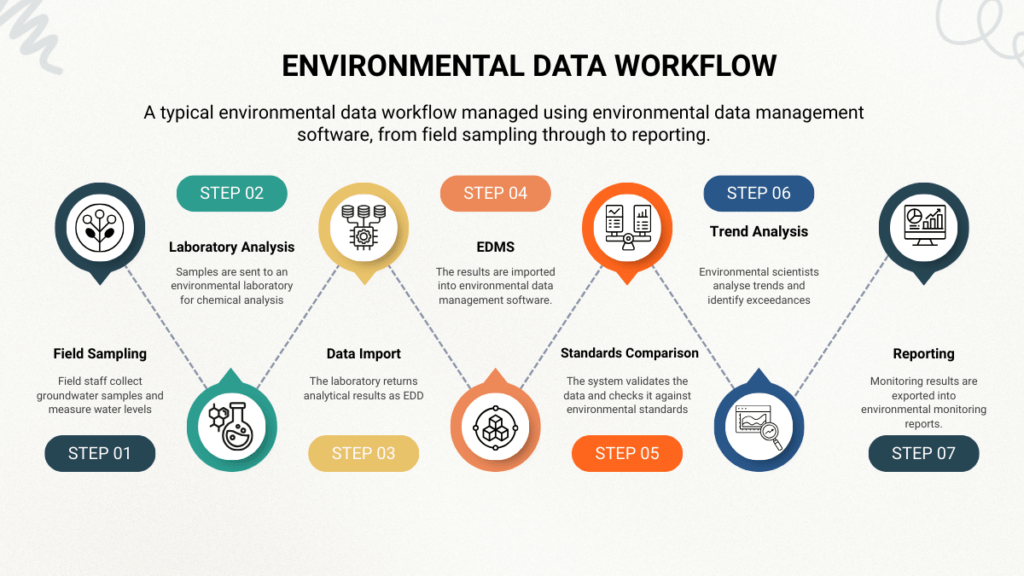
Figure 1. A typical environmental data workflow managed using environmental data management software, from field sampling through to reporting.
Environmental monitoring programs produce large volumes of data from field sampling, laboratory analysis, environmental standards, and compliance reporting.
Environmental monitoring begins with field sampling. Scientists collect groundwater, surface water, and soil samples and record environmental measurements such as pH, conductivity, and dissolved oxygen.
Samples are then sent to environmental laboratories for chemical analysis. The laboratories return analytical results as electronic data files.
Environmental data management software imports these laboratory results into a structured environmental database. The system links results to the correct sampling locations, analytes, and monitoring rounds.
Environmental scientists then perform quality assurance and quality control checks to ensure the data is accurate and complete.
Monitoring results are compared against environmental standards and regulatory guideline values to identify exceedances.
Finally, environmental professionals analyse trends, create dashboards and graphs, and generate environmental monitoring reports.
Environmental data management systems such as ESdat help automate these processes by integrating field data, laboratory data, environmental standards, and reporting workflows.
Environmental data management software is the umbrella topic that connects multiple subtopics beneath it:
- monitoring workflows
- laboratory data handling
- standards comparison
- dashboards
- compliance reporting
- historical data migration
Figure 2 below illustrates how environmental data flows from field and laboratory sources into a central database before being used in dashboards and reports.
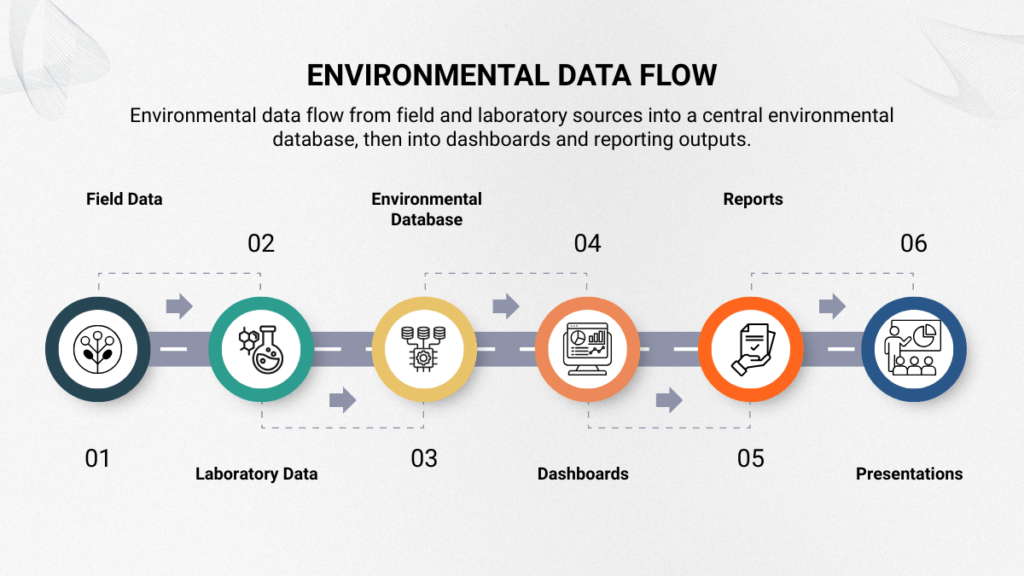
Figure 2. Environmental data flows from field and laboratory sources into a central environmental database, then into dashboards and reporting outputs.
Why environmental data management software matters
Environmental monitoring programs become harder to manage as they grow. A small project may survive with a spreadsheet or two. A long-running, multi-site, regulated monitoring program usually will not.
The pressure points are familiar:
1. Environmental data volumes increase over time
Each round of monitoring adds more samples, more analytes, more locations, more metadata, more standards checks, and more reporting requirements. Historical data becomes more valuable, but also harder to work with if it is not standardised.
2. Data comes from multiple sources
Environmental programs do not run on one dataset. They combine:
- field observations
- groundwater levels
- laboratory chemistry
- sensor and logger feeds
- maps and location data
- standards and licence limits
- historical records
When each of those sits in a different format or location, the workflow becomes slow and fragile.
3. Manual handling creates risk
The more often people manually copy, reformat, or merge environmental results, the greater the chance of:
- transcription errors
- wrong units
- missing metadata
- broken formulas
- inconsistent location codes
- Incorrect standards comparisons
4. Reporting expectations rise
Clients, regulators, boards, and communities increasingly expect faster, clearer, and more defensible reporting. They want answers, not just raw files.
5. Compliance decisions depend on data quality
When environmental data is fragmented, exceedances are easier to miss, context is harder to reconstruct, and follow-up decisions take longer. That is one reason environmental compliance software and environmental standards databases are such important adjacent topics to EDMS.
What counts as environmental data?
Environmental data is broader than many people assume. It is not just laboratory results.
In practice, environmental data commonly includes:
- groundwater level data
- groundwater quality data
- surface water quality data
- soil and sediment chemistry
- air quality and dust monitoring data
- emissions and effluent data
- field measurements such as pH, conductivity, dissolved oxygen, turbidity, and temperature
- bore and well construction details
- field observations and inspection notes
- sensor and logger time-series data
- sample identifiers and chain-of-custody details
- laboratory analytical results
- environmental standards and licence limits
- historical records from legacy systems, spreadsheets, or previous consultants
That range matters because environmental data management software must support relationships between these data types, not just store them separately. A result is only useful when it can be linked to the right site, location, sampling event, analytical method, unit, and standards context.
How environmental monitoring workflows operate
One of the best ways to explain environmental data management software is to explain the workflow it supports.
Example: Environmental Monitoring Data Workflow
A typical groundwater monitoring program produces data that follows a structured workflow.
- Field staff collect groundwater samples and measure water levels.
- Samples are sent to an environmental laboratory for chemical analysis.
- The laboratory returns analytical results as electronic data deliverables.
- The results are imported into environmental data management software.
- The system validates the data and checks it against environmental standards.
- Environmental scientists analyse trends and identify exceedances.
- Monitoring results are exported into environmental monitoring reports.
Environmental data management systems such as ESdat automate many of these steps by integrating laboratory data imports, environmental standards databases, and reporting tools.
The standard environmental monitoring workflow
A typical groundwater monitoring program produces data that follows a structured workflow.
Planning → Field data collection → Sample collection → Laboratory analysis → Data import → Validation and QA/QC → Standards comparison → Trend analysis → Reporting → Communication
That is the workflow many environmental teams repeat month after month, quarter after quarter, and year after year.
Planning
Programs begin with sites, locations, analytes, monitoring schedules, and objectives. The more standardised the planning stage is, the smoother everything downstream becomes.
Field data collection
Field teams collect observations, measurements, and samples. This may include groundwater levels, field chemistry, inspection notes, or photos. Modern systems increasingly support browser-based and mobile field tools. ESdat’s public help documentation describes both a Field Portal and a Field App, including mobile and offline workflows.
Laboratory analysis
Samples go to the laboratory, which produces analytical results, often in structured electronic formats.
Data import
Those results need to be loaded into the system accurately. This is one of the most important workflow stages, because manual re-entry is slow and error-prone.
Validation and QA/QC
Imported data must be checked for completeness, consistency, and suitability for use. This can include reviewing qualifiers, units, duplicate records, missing metadata, and the integrity of location or sample identifiers.
Standards comparison
Results are then compared against regulatory values, guideline values, trigger values, site-specific standards, or licence limits.
Trend analysis
After standards checks, organisations often need charts, dashboards, tables, maps, trend lines, and interpretation.
Reporting
The final step is not just export. It is communication: compliance reports, internal dashboards, board summaries, regulator submissions, public portals, and stakeholder updates.
The core functions of an EDMS
Environmental data management software usually combines six major functions.
1. Data capture
This includes field observations, field measurements, sample details, water levels, photos, and other information collected before laboratory analysis. Public ESdat support materials describe field tools that support tablets, phones, and PCs, with offline capability in the Field App.
2. Laboratory data import
This is one of the most commercially important parts. Environmental organisations receive large volumes of laboratory analytical data, and those files need to be loaded consistently and quickly.
3. Data validation and QA/QC
A good EDMS should support quality review before data flows into analysis or reporting. Even when human review remains necessary, the platform should reduce repetitive checking and create a clearer audit trail.
4. Environmental standards comparison
Environmental results often need to be compared to standards. With ESdat, administrators can upload site-specific standards, request additional standards, and work with complex action levels that may depend on pH, hardness, depth, matrix, or range values.
5. Analysis and visualisation
Environmental teams need chemistry tables, dashboards, maps, graphs, and trend tools.
6. Reporting and publishing
A mature platform helps users produce internal reports, client deliverables, compliance reports, and public-facing outputs. ESdat’s public portal is designed to share approved monitoring data, including groundwater, surface water, dust, emissions, and effluent.
The most important features to look for
When people ask about the “best environmental data management software,” the answer usually depends on fit. Still, there are some core capabilities that matter in nearly every evaluation.
Centralised environmental database
The platform should create one reliable source of truth across projects, sites, locations, analytes, rounds, results, and standards.
Structured laboratory data import
If laboratory imports are weak, the entire workflow slows down. That is why laboratory data import is so important.
Field mobility
Environmental monitoring is not an office-only workflow. Mobile access matters, especially when field teams need to work in remote areas or without stable connectivity.
Standards management
The system should make it practical to compare results against environmental standards and to maintain site-specific limits where needed.
QA/QC support
A good EDMS improves data confidence by helping teams review imports, identify issues, and maintain consistency.
Dashboards, tables, and graphing
The point of collecting data is not to archive it. It is to interpret it.
Integrations
Many teams need to connect environmental data to Power BI, Excel, ArcGIS, or related tools. ESdat’s OData support documentation explicitly lists secure connections to Power BI, Excel, Power Automate, Power Query, and ArcGIS.
Historical data migration
The best platforms not only support new data. They help organisations make historical records usable.
Public communication options
For some organisations, the right system should also support transparency for regulators or the public.
Environmental standards databases and compliance monitoring
Many organisations do not start by searching for “environmental data management software.” They start by searching for a narrower problem:
- environmental compliance software
- environmental standards database
- exceedance reporting
- groundwater guideline comparison
- environmental reporting software
That is because business pain usually first appears as a compliance problem. Teams need to know:
- Which results exceeded which standards
- Which locations changed
- Which analytes triggered action
- Which reports must be updated
- Which jurisdictions or site limits apply
A good environmental data management system helps by linking results, analytes, matrices, standards, and reporting logic in one place.
More information on:
- What are Environmental Guidelines and Standards?
- Environmental Compliance Standards
- Environmental Monitoring Workflows
- Environmental Standards Databases Explained
With ESdat, environmental standards are not treated as mere afterthoughts. ESdat allows importing reference standards, uploading custom standards, requesting new standards, and handling complex action-level logic.
Environmental reporting software and decision-making
A large part of the value of environmental data management software appears at the reporting stage.
Raw results do not answer practical questions on their own. Organisations need to know:
- What changed since the last round?
- Which wells exceeded trigger levels?
- Which sites should be investigated further?
- Are trends improving or deteriorating?
- Which analytes belong in this report?
- What should be communicated to a client, regulator, or community?
That is why environmental reporting software is such an important adjacent search term. Reporting is where data becomes decision support.
A mature reporting workflow should be:
- repeatable
- traceable
- fast to update
- consistent across rounds and projects
With ESdat, data analysis and reporting are core features. It also offers chemistry tables and external data feeds that support downstream dashboards and reporting workflows.
Environmental data management software vs spreadsheets
Spreadsheets are familiar. They are flexible and easy to start with. For small one-off tasks, they may be enough.
But spreadsheets usually become a weak long-term system when environmental programs involve:
- Repeated laboratory imports
- many analytes
- many locations
- multiple standards
- multiple users
- historical time-series analysis
- regulated reporting
- cross-project consistency
The problem is not that spreadsheets are bad. The problem is that they are easy to overextend. Hidden formulas, inconsistent templates, version conflicts, manual cut-and-paste work, and fragmented file structures make them a risky foundation for long-running monitoring programs.
A fit-for-purpose environmental data management system improves data quality and governance through standardised workflows for data validation, metadata, and compliance screening against environmental regulatory thresholds. Explore Spreadsheets vs Environmental Data Management Software (EDMS)
Who uses environmental data management software?
Environmental consultants
Consultants often need a system that supports many projects and clients, enables repeatable imports, provides fast reporting, and effectively handles historical data.
Mining companies
Mining sites often operate long-term monitoring programs and may need field, lab, logger, environmental standards, and reporting workflows in one system.
Government and regulators
Government teams may use environmental monitoring software to organise monitoring data, review compliance with standards, and support public communication.
Industrial and energy facilities
Industrial and energy sites often need environmental compliance software for site monitoring, discharge monitoring, emissions reporting, and audit readiness.
Utilities, landfills, and infrastructure projects
These programs often require repeated sampling, trend analysis, site-specific limits, and consistent reporting to regulators. Environmentalstandards.info already has supporting content around landfill and compliance use cases.
How to evaluate and choose a platform
Choosing the best environmental data management software is not primarily about which product has the longest list of features on its website. It is about whether the system supports your actual workflow.
A practical evaluation should ask:
1. What data sources do we need to manage?
Field data, laboratory data, logger data, historical data, standards, maps, photos?
2. How important is laboratory automation?
If lab imports are central to the workflow, that should be weighted heavily.
3. How complex are our standards?
Do you need multiple jurisdictions, site-specific standards, conditional action levels, or frequent updates?
4. How important is reporting speed?
How often do you produce regulatory, board, or stakeholder reports?
5. What downstream tools do you use?
Do you need Power BI, ArcGIS, Excel, or APIs?
6. Who will use the system?
Scientists, consultants, regulators, project managers, field teams, data managers?
7. What is the migration path?
Can you bring historical data in without spending months cleaning disconnected spreadsheets first?
A good software decision usually reflects the whole operational workflow, not just the first import step.
ESdat as an example of environmental data management software
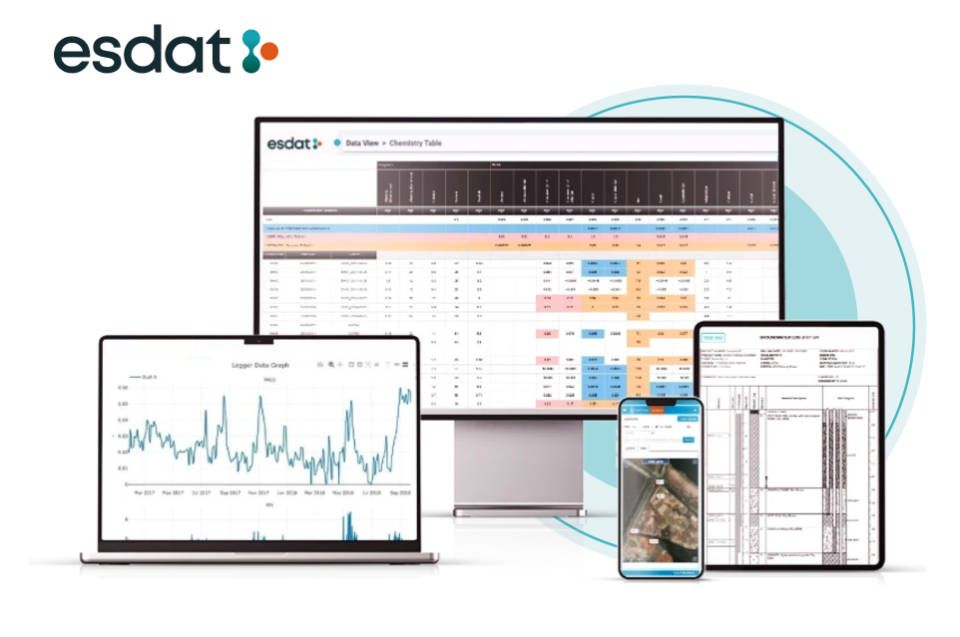
A useful way to understand environmental data management software is to look at a real example.
ESdat is produced by EarthScience Information Systems (EScIS), founded in 2003. The platform is used by consulting, industrial, government, and mining organisations and includes major product areas such as laboratory integration, environmental standards, field programs, logger data, data migration, reporting, and public portal capabilities. ESdat has:
- field tools for portal and app workflows
- support for importing and managing environmental standards
- handling of complex environmental action levels
- bulk migration of historical data via the Data Migration Manager
- secure OData connections for Power BI, Excel, Power Query, Power Automate, and ArcGIS workflows.
ESdat is a faster, browser-based, no-code environmental data management system designed for project managers and scientists.
Good examples of environmental data management
Concept relationship map
| Environmental data management software | The umbrella category | The core system that connects data capture, import, standards, analysis, and reporting |
| Environmental monitoring software | Monitoring program workflows | Usually a subcategory or use case of EDMS |
| Environmental compliance software | Standards and reporting focus | Often the compliance-facing side of an EDMS |
| Environmental reporting software | Dashboards, reports, exports | Usually the reporting layer of an EDMS |
| Environmental standards database | Guideline and trigger values | A critical module or function inside an EDMS |
| Laboratory data import software | Loading analytical results | One of the most valuable workflow capabilities inside an EDMS |
| Groundwater monitoring software | Groundwater-specific workflows | A sector/use-case expression of EDMS |
Related Environmental Software Categories
Environmental data management software sits at the centre of several related environmental software categories.
- Environmental monitoring software – software used to manage monitoring programs and environmental sampling data.
- Environmental compliance software – software used to track environmental performance and compare results against regulatory standards.
- Environmental reporting software – software used to generate environmental monitoring reports and compliance documentation.
- Environmental standards databases – databases of environmental guideline values used to assess monitoring results.
In practice, many modern environmental data management platforms combine these capabilities into a single system.
As shown in Figure 3 below, environmental data management software is the umbrella category linking environmental monitoring software, environmental compliance software, environmental reporting software, and environmental standards databases.
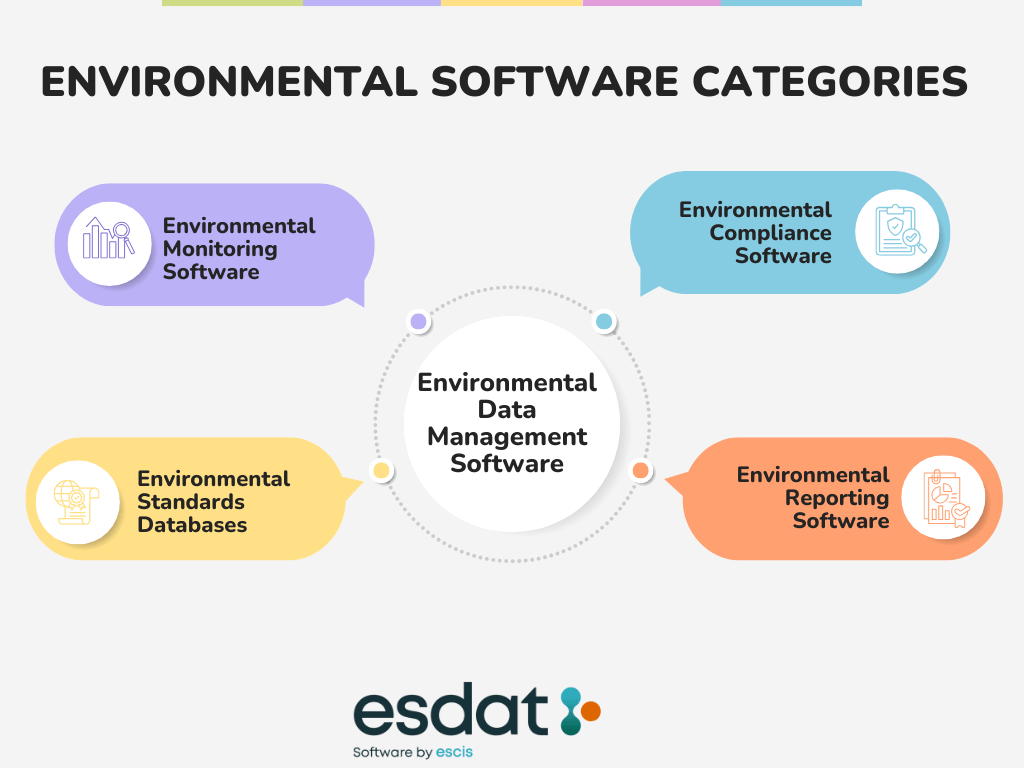
Figure 3. Environmental data management software sits at the centre of related categories, including monitoring, compliance, reporting, and standards management.
Frequently asked questions
What is environmental data management software?
Environmental data management software is software used to collect, store, validate, analyse, and report environmental monitoring data.
What is the difference between environmental monitoring software and environmental data management software?
Environmental monitoring software usually refers to tools used to run monitoring programs and manage monitoring results. Environmental data management software is the broader category and often includes monitoring, lab imports, standards comparison, dashboards, and reporting.
Why do environmental consultants use environmental data management software?
Consultants use it to reduce manual data handling, improve consistency, manage historical records, compare results against standards, and speed up reporting.
What types of data can an EDMS manage?
A good EDMS can manage field measurements, groundwater and surface water data, soil data, laboratory results, logger data, standards, licence limits, and historical datasets.
Can environmental data management software help with compliance?
Yes. Good systems help teams compare results against standards, identify exceedances, maintain traceable records, and produce compliance reports.
Can environmental data management software connect to Power BI or ArcGIS?
Some systems can. ESdat’s, for example, OData feed can connect securely to Power BI, Excel, Power Query, Power Automate, and ArcGIS.
Does environmental data management software support field work?
Modern systems often do. ESdat’s Field Portal and Field App documentation describes field workflows for phones, tablets, PCs, and offline use.
Is environmental data management software better than spreadsheets?
For small one-off tasks, spreadsheets may be enough. For large, regulated, multi-user, or long-running environmental programs, a dedicated EDMS is usually more scalable, more consistent, and less error-prone.
Glossary of Environmental Data Management Terms
- Environmental Data Management Software (EDMS)
- Software used to store, validate, analyse, and report environmental monitoring data such as groundwater quality results, soil chemistry, and environmental standards.
- Environmental Monitoring Software
- Software used to manage environmental monitoring programs including groundwater monitoring, surface water monitoring, and air monitoring.
- Environmental Compliance Software
- Software used to track environmental monitoring results and compare them against regulatory limits, environmental guidelines, or licence conditions.
- Environmental Reporting Software
- Software used to generate environmental monitoring reports, dashboards, and compliance summaries for regulators and stakeholders.
- Environmental Standards Database
- A structured database of environmental guideline values used to assess monitoring results and identify exceedances.
- Laboratory Data Import
- The automated process of loading laboratory analytical results into an environmental data management system.
- Environmental Monitoring Program
- A structured program that collects environmental samples and measurements to assess environmental conditions or compliance.
- QA/QC (Quality Assurance and Quality Control)
- Processes used to ensure environmental monitoring data is accurate, complete, and suitable for analysis.
- Environmental Exceedance
- A monitoring result that exceeds a regulatory guideline value, trigger value, or environmental standard.
- Environmental Data Dashboard
- A visual interface used to analyse environmental monitoring data using charts, maps, and trend graphs.